English quick take
A good poster prompt is a composition brief, not a plot summary. Name the subject, the frame, the light, the palette, and the empty space for the title. Then add the type locally.
 GirigoApp.com
Girigo AI Studio 9 min read
Build an original horror poster concept with one strong image, deliberate negative space, and typography you control.
English quick take
A good poster prompt is a composition brief, not a plot summary. Name the subject, the frame, the light, the palette, and the empty space for the title. Then add the type locally.
Local look lab
Upload a photo you own. The canvas, grade, grain, and caption stay in this browser.
Choose a photo to start. Nothing leaves this browser.
Prompt studio
Pick a look, set the direction, and copy a prompt that names what must stay fixed.
Direction: cinematic portrait; preserve identity; one person.
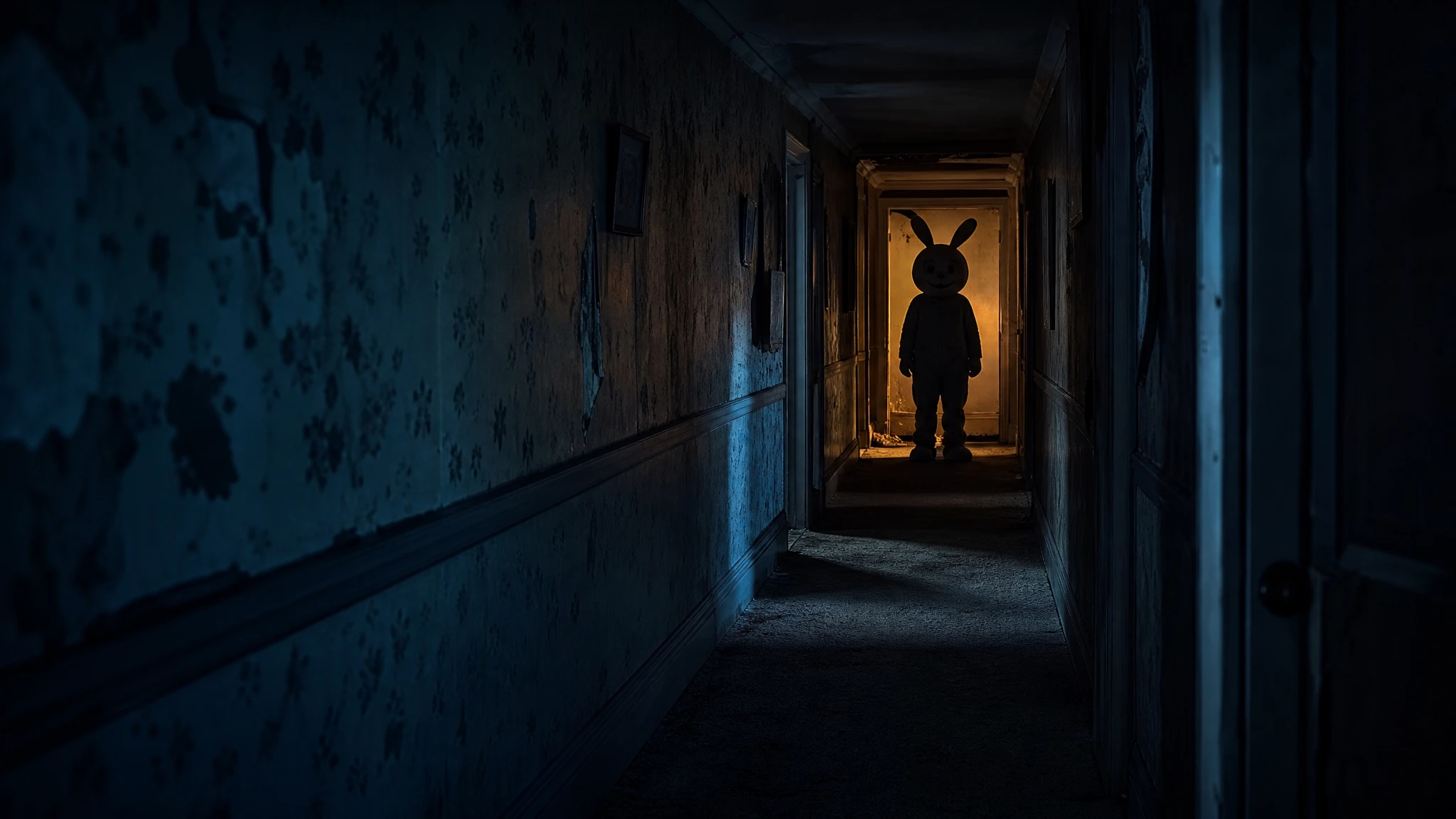
Create an original vertical horror movie poster photograph. A fictional mascot character with a round plush head and a stitched smile stands at the end of a dark suburban hallway. The costume is worn and slightly too large; the eyes are not visible. Use a single warm practical light behind the character, a cold blue fill in the foreground, and realistic carpet and wallpaper texture. Leave deep negative space at the top for a title and at the bottom for credits. The character must be an original design, not an existing copyrighted mascot. No text, no logos, no watermark, no extra people.
Three useful outcomes
One subject, one light idea, and one clear area for type.
Open the studioSet the title locally with the caption editor.
Open the studioUse genre cues without copying an existing film's key art.
Open the studioPrompt lab
Useful for comparing several creature-design routes.
Create an original vertical horror movie poster photograph. A fictional mascot character with a round plush head and a stitched smile stands at the end of a dark suburban hallway. The costume is worn and slightly too large; the eyes are not visible. Use a single warm practical light behind the character, a cold blue fill in the foreground, and realistic carpet and wallpaper texture. Leave deep negative space at the top for a title and at the bottom for credits. The character must be an original design, not an existing copyrighted mascot. No text, no logos, no watermark, no extra people.
Avoid: existing mascot, text, logo, watermark, extra people
A budget route works well for an architectural plate.
Create an original vertical horror poster photograph set in a liminal office corridor. Endless yellow wallpaper, damp carpet, and buzzing fluorescent lights recede into a dark doorway. A single small human silhouette stands far down the hall, facing away. Use a wide-angle lens, slightly uneven ceiling lines, and a sickly yellow-green palette. Leave a clean dark band at the bottom for a title and credits. No readable signage, no text, no logos, no watermark, no extra figures.
Avoid: readable signage, text, logo, watermark, extra figures
Fast queues help when you are testing several compositions.
Create an original vertical folk-horror poster photograph. A lone figure in a dark coat stands at the edge of a wheat field under a pale overcast sky. A ring of small standing stones is visible behind them; a red ribbon hangs from one stone. Use natural daylight, fine film grain, and a muted earth palette with one saturated red accent. Keep the figure small in the frame and leave a large empty sky area at the top for a title. No text, no logos, no watermark, no extra people.
Avoid: text, logo, watermark, extra people, bright fantasy colors
WaveSpeed, SeeAPI, fal, Replicate, Kie
| Provider | Best for | Typical route | Docs |
|---|---|---|---|
| ReplicateExperiment-first | Broad catalogue for experiments and batch comparisons | Community and first-party image/video models | Docs |
| WaveSpeedBudget-first | Low-cost image edits and image-to-video drafts | Seedream edit, FLUX Kontext, Wan image-to-video | Docs |
| falSpeed-first | Fast hosted queues and strong model coverage | FLUX, Kling, and other hosted media models | Docs |
| SeeAPIRouting layer | One API surface for several model families and fallback routes | Image and video inference endpoints | Docs |
| KieCharacter-first | Nano Banana image edits and Kling video routes | Nano Banana, Kling video | Docs |
Step by step
Failure modes
Editorial brief
Poster prompts fail when they describe a whole movie instead of one frame. The model cannot compress a plot into a composition, but it can follow a visual brief: subject, distance, light, palette, and empty space. That is the structure this page uses. The title is a separate layer, added after the image.
Generate the plate at the final aspect ratio. Check it at 200 pixels wide; if the subject disappears, the poster will not work in a feed. Add the title in the local editor, then check contrast at 100 percent. If the title needs a shadow, add a subtle one instead of darkening the whole image. Keep the text-free plate so you can reuse it for a different title treatment.
Deeper guide
The prompt is only half the job. The field note walks through the failure modes, the identity check, and the model comparison behind this page.
Open the field noteFAQ
Use it for a clearly labeled fan concept or commentary. Do not imply official affiliation, copy the original key art, or use cast likenesses without permission.
One strong silhouette, one dominant light source, and a high-contrast area for the title. Too many details disappear in a thumbnail.
Use a budget image model for composition tests, then move to a stronger model only after the silhouette works. Replicate is useful for comparing several routes; WaveSpeed and fal are good for fast iterations.
Check the model license and provider terms, use original elements, and disclose AI assistance where required. Do not sell a design that copies a protected film's key art.
Checked sources